Programatically create Partner Community Accounts using Apex / Salesforce
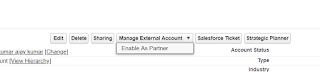
Step 1: GoTo Account Tab and Create a account name "User Account" Step 2: On Account Details page click on button " Manage External Account" and the click on " Enable As Partner". Make sure login user profile must have assign role Then user users=new users(); users.email='test@gmail.com'; users.firstname='ajay'; users.username='test@gmail.com'; users.lastname='Kumar'; Id p = [select id from profile where name=' Partner Community Profile' ].id; account ac= [select id from account where name='User Account' limit 1 ]; Contact objectContact = new Contact(LastName =users.lastname,AccountId = ac.Id); insert objectContact; User u = new User(contactId=objectContact.Id, username=users....